How to use AI on the platforms your business already has
Your business is split across Shopify, email, your calendar, your Drive. The cost is the space between them. Connectors are how Aqua closes that gap, one door at a time, always with your permission
 Zachary Sheldon4 min read
On this page
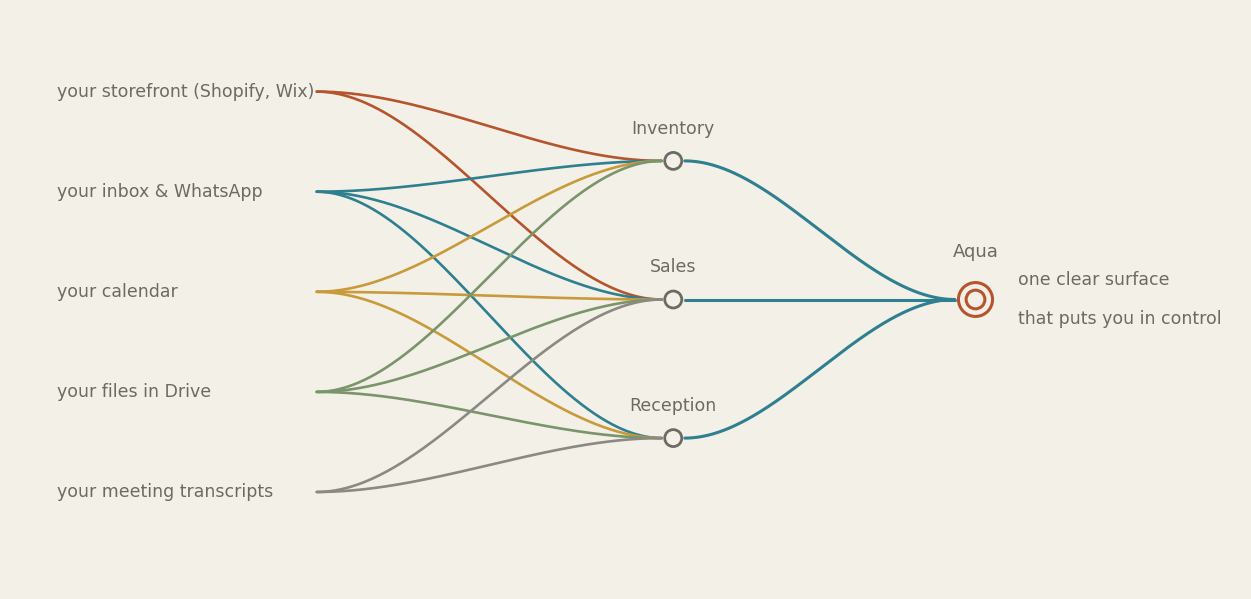
Your business is split across Shopify, email, your calendar, your Drive. The cost is the space between them. Connectors are how Aqua closes that gap, one door at a time, always with your permission
Your business does not live in one place. Your storefront is on Shopify, or maybe Wix. Your conversations are split across email and WhatsApp. Your calendar is somewhere else again, your files in Drive, your notes on your phone. Each tool is fine on its own. The cost is the space between them, and the weight of being the one person who holds all the pieces together in your head.
That “platform fragmentation” is the tax you pay for running a modern business, and until now there hasn’t been much to do about it but pay it. Connectors are how Aqua takes that weight off your shoulders. Each connector is a door into a tool you already use. And when you connect Aqua and the crew to your business tools, you personalize how they learn and what they can see and do.
Start wherever you’re comfortable
You don’t have to hand everything over on day one. Connecting is a journey, and it’s built so you can open as much or as little as you like.
When you onboard with Aqua, you’ll decide what connections you’re ready to make. The easiest way is to give Aqua your website address. Aqua browses your public page the way any visitor would, and learns your brand voice, your services, how you talk about yourself. Nothing private, nothing logged in.
Any time you’re ready, at onboarding or later, you can take the step up and connect to your platforms. Shopify, your calendar, your inbox, is a bigger step, and it’s where the power is. Even read-only, it reaches what a public page never shows: your orders, your bookings, your real numbers. This is the door worth walking through.
Unlocking the value of platforms
Here’s my own setup, since I run on this too. I keep our knowledge base in Google Drive, strategic reports, content policies, the important reference material. I connect Drive, and Aqua can read across all of it: I can ask a question that spans six documents and get an answer that actually holds them together, instead of opening each one and holding it in my head.
The other half is what I take back out. When I hit something that really matters and can’t be regenerated, a signed agreement, a compliance document, I move it from the general clutter of Drive into the Vault, where the important things live and don’t get lost. That’s the same idea as the Playbook from the first post: Aqua isn’t just reading my files, it’s helping me decide what’s worth keeping close, and putting it somewhere I’ll find it later.
Permission you can actually hold in your head
Giving each part of your crew only the connections its job needs isn’t bureaucracy. It’s that permission spread across a dozen settings screens is permission nobody really understands, which means nobody’s really in control.
Do it through the crew instead and it stops being a settings problem and becomes a conversation. You connect Drive because you asked Aqua to work from your research. Shipping questions surface the Shopify connector, because that’s where the answer lives. Each connection has a reason you can see, because it came up in the course of real work. That’s control without the cognitive overload, transparency you can keep in your head.
And the standing rule from the first post holds through all of it. A connector lets Aqua read and reach; it never removes the gate. Nothing goes out to another person, no order changed, no email sent, no form filed, until you approve it. More access, same gate. The access is what makes the work good; the gate is what makes the access safe.
What we’re building next
Today you manage connectors yourself. Where we’re heading: your crew organizes them for you, so a given member only has the connections its job needs, and can suggest one that would help (“I could do this faster if you connected your calendar”). It isn’t live yet, so this is a look ahead.
As Aqua’s crew grows, we’ll include members who teach you how to get the most out of the online platforms you already use. For example, if you sell physical goods and digital packages, you can build specialized crew members designed to connect with Shopify. An Inventory Keeper handles data entry, drafts invoices, and schedules orders, while a Shopify Pro gives expert advice on Shopify’s advanced analytics. Our philosophy of simple design for powerful AI will make this feel as natural as having a conversation.
We’re always learning from our customers about what connectors they want to see next. If you have a suggestion, get in touch.
The series Part 1 — Playbook · Part 2 — Projects · Part 3 — Connectors (you’re here)
Aquarius · peopleaquarius.com